
Learn how to build an impressive LinkedIn profile as a student with practical tips for your headline, skills, education, projects, experience, and networking.
Building a strong LinkedIn profile as a student can help you create a professional online presence before graduation. LinkedIn can be used to showcase your education, skills, projects, certifications, internships, achievements, and career interests in one place. A well-organized profile can also make it easier for recruiters, employers, professionals, and potential mentors to understand what you can offer.
You do not need years of work experience to create a valuable profile. Students can build credibility by highlighting academic projects, volunteer activities, coursework, technical skills, competitions, certifications, part-time work, and personal projects. The key is to present genuine achievements clearly and keep the profile updated as your experience grows.
Why Students Should Have a LinkedIn Profile
A LinkedIn profile can act as a digital professional introduction. Instead of relying only on a traditional resume, students can use their profile to provide additional context about their interests, skills, education, and career goals.
A professional profile may help students:
- Build a professional identity.
- Discover internship opportunities.
- Connect with industry professionals.
- Showcase projects and achievements.
- Learn about different career paths.
- Follow companies and organizations.
- Find relevant job opportunities.
- Build a professional network before graduation.
The goal is not simply to collect connections. The goal is to create a profile that accurately represents your skills, interests, and professional direction.
Choose a Professional Profile Photo
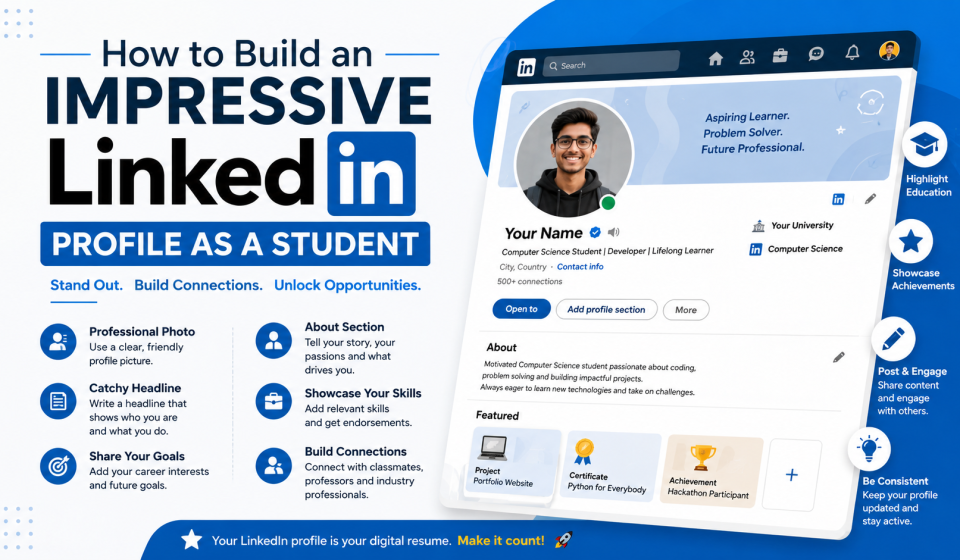
Your profile photo is one of the first things people may notice. Choose a clear, recent photograph where your face is easy to recognize.
A professional student profile photo does not necessarily require an expensive studio session. Use good lighting, a simple background, appropriate clothing, and a natural expression.
Avoid using:
- Group photographs.
- Blurry images.
- Party photographs.
- Heavily edited pictures.
- Images with distracting backgrounds.
- Unprofessional poses.
A simple, clear photograph can make your profile look more complete and professional.
Create a Strong LinkedIn Headline
Your headline is one of the most important sections of your LinkedIn profile. Students should avoid using only a generic phrase such as “Student at XYZ College.”
Instead, communicate your field of study, interests, skills, or career direction.
For example:
Computer Science Student | Aspiring Web Developer | HTML, CSS, JavaScript | Interested in Software Development
Or:
Business Administration Student | Marketing Enthusiast | Digital Marketing & Content Strategy
A strong headline helps visitors quickly understand who you are and what type of opportunities interest you.
Write an Effective About Section
The About section gives you more space to introduce yourself. Keep it clear, authentic, and focused on your professional development.
A student About section can include:
- Your current course or degree.
- Your main areas of interest.
- Skills you are developing.
- Projects you have completed.
- Career goals.
- Internship interests.
- What you are currently learning.
Highlight Your Education
Students often have limited professional experience, so the Education section can be especially important.
Include:
- College or university name.
- Degree or program.
- Field of study.
- Start and expected graduation dates.
- Relevant activities.
- Academic achievements when appropriate.
- Important coursework or projects.
You can also mention student organizations, competitions, clubs, or leadership activities that demonstrate useful skills.
Showcase Projects
Projects can make a student LinkedIn profile much stronger because they demonstrate practical application of knowledge.
Examples include:
- Websites.
- Mobile applications.
- Software projects.
- Research projects.
- Marketing campaigns.
- Graphic design work.
- Data analysis projects.
- Business plans.
- Academic projects.
For each project, explain what you built, what problem it addressed, which tools or technologies you used, and what you learned.
Instead of writing:
Website Project
Write:
Student Portfolio Website
Developed a responsive personal portfolio website using HTML and CSS to showcase academic projects, technical skills, and contact information.
This gives visitors a better understanding of your abilities.
Add Relevant Skills
The Skills section helps communicate your areas of expertise. Choose skills that genuinely reflect your knowledge and experience.
Technical students might include:
- HTML.
- CSS.
- JavaScript.
- Python.
- Java.
- SQL.
- Git.
- Web Development.
- Database Management.
Students in other fields can include relevant skills such as:
- Digital Marketing.
- Content Writing.
- Communication.
- Research.
- Data Analysis.
- Project Management.
- Microsoft Office.
- Presentation Skills.
Avoid adding dozens of unrelated skills. Focus on skills that support your career goals.
Add Certifications and Courses
Online courses and certifications can strengthen your profile when they are relevant to your field.
Include certifications from reputable learning platforms, educational institutions, professional organizations, or recognized technology providers.
For each certification, provide the:
- Course or certification name.
- Issuing organization.
- Completion date.
- Credential information when applicable.
Do not add certificates simply to make your profile look longer. Relevance matters more than quantity.
Include Internships and Work Experience
Students should include internships, part-time jobs, freelance work, volunteering, or other relevant experiences when appropriate.
You do not need a long employment history. Focus on responsibilities and achievements rather than simply listing job titles.
For example:
Web Development Intern
- Assisted with website updates.
- Created responsive webpage components.
- Helped identify and resolve basic website issues.
- Collaborated with team members on development tasks.
Use clear action words such as developed, created, analyzed, organized, designed, researched, assisted, managed, and improved.
Add Achievements and Extracurricular Activities
Your professional value is not limited to grades and employment.
Consider including:
- Hackathons.
- Competitions.
- Scholarships.
- Academic awards.
- Student clubs.
- Leadership roles.
- Volunteer activities.
- Conferences.
- Workshops.
- Public speaking.
- Community projects.
These experiences can demonstrate teamwork, leadership, communication, problem-solving, and initiative.
Customize Your LinkedIn URL
A customized LinkedIn profile URL can look cleaner on a resume, portfolio, or email signature.
When possible, use a simple version of your name rather than a long combination of random numbers and characters.
For example:
linkedin.com/in/yourname
This makes your professional profile easier to share.
Build Your Professional Network
Creating a profile is only the first step. Networking can help you learn about industries and career opportunities.
Start by connecting with:
- Classmates.
- Professors.
- Alumni.
- Internship supervisors.
- Industry professionals.
- Recruiters.
- Professional organizations.
- People you meet at career events.
When sending a connection request, personalize it when appropriate. A short message explaining why you want to connect can be more meaningful than sending random requests.
Share Useful Content
Students can demonstrate their interests by sharing professional content. You do not need to post every day.
You could share:
- Project updates.
- Course completion.
- Industry insights.
- Learning experiences.
- Event participation.
- Technical tutorials.
- Professional achievements.
- Reflections on internships.
Avoid posting information simply for the sake of activity. Focus on content that supports your professional identity.
Keep Your Profile Professional
Review your profile before sharing it with recruiters or employers. Check spelling, grammar, dates, descriptions, and contact information.
Make sure your profile is consistent with your resume. Differences in education dates, job titles, or project information can create confusion.
Also review your public activity and make sure your professional presence reflects the image you want employers to see.
Common LinkedIn Mistakes Students Should Avoid
Using a Generic Headline
A headline such as “Student” does not tell visitors what you study or what you want to pursue.
Leaving Sections Empty
An incomplete profile may make it harder for recruiters and professionals to understand your background.
Exaggerating Skills
Do not claim advanced expertise in technologies or skills you have barely used. Be honest about your current level.
Copying Other Profiles
Using another person’s wording can make your profile sound artificial. Use your own experiences and writing style.
Collecting Random Connections
A large number of irrelevant connections does not necessarily create a strong professional network. Focus on meaningful relationships.
Update Your LinkedIn Profile Regularly
Your LinkedIn profile should evolve as you gain experience. Add new projects, internships, certifications, skills, achievements, and volunteer activities.
Set a reminder to review your profile every few months. Updating it regularly can prevent you from forgetting important accomplishments.
Practical LinkedIn Checklist for Students
Before considering your profile complete, check whether you have:
- A clear professional photo.
- A specific headline.
- A useful About section.
- Updated education information.
- Relevant projects.
- Appropriate skills.
- Certifications.
- Internship or work experience.
- Achievements and activities.
- A customized profile URL.
- Professional connections.
- Consistent information across your resume and profile.
Source Links
https://www.linkedin.com/help/linkedin
https://www.linkedin.com/learning
Conclusion
Building an impressive LinkedIn profile as a student is less about having extensive professional experience and more about presenting your current skills, education, projects, interests, and achievements effectively. A strong headline, professional photo, useful About section, relevant projects, certifications, and carefully selected skills can create a solid foundation.
Students should also use LinkedIn as a professional networking and learning platform rather than treating it as an online resume only. Connecting with alumni and professionals, following companies, sharing useful experiences, and participating in industry discussions can help you learn more about potential career paths.
Most importantly, keep your profile authentic and updated. Your LinkedIn profile can grow with you throughout college, so continue adding meaningful experiences as you develop new skills and move closer to your career goals.
Frequently Asked Questions (FAQs)
1. Do students really need a LinkedIn profile?
A LinkedIn profile can be useful for students who want to build a professional presence, explore careers, connect with professionals, and discover internships or job opportunities. It can also provide a place to showcase projects and achievements.
2. What should a student put in the LinkedIn headline?
Students can include their degree or field of study, relevant skills, career interests, or professional goal. For example, a computer science student might mention software development, web development, or specific technologies they are learning.
3. Can I create a LinkedIn profile without work experience?
Yes. Students can highlight education, academic projects, certifications, volunteer activities, extracurricular achievements, technical skills, and coursework. Work experience is only one part of a professional profile.
4. How many skills should a student add to LinkedIn?
There is no need to add every skill you have encountered. Focus on relevant skills that accurately represent your abilities and align with the type of internships or jobs you want.
5. Should students include college projects on LinkedIn?
Yes. Academic and personal projects can demonstrate practical skills, problem-solving abilities, creativity, and initiative. Explain what you created, which tools you used, and what you learned.
6. What should I write in the LinkedIn About section?
Introduce yourself, explain what you study, describe your main interests and skills, mention relevant projects or achievements, and explain the type of career opportunities you are interested in. Keep the information genuine and easy to read.
7. Should I connect with recruiters on LinkedIn?
Students can connect with relevant recruiters, especially those working in industries or companies that match their career interests. A short, personalized message can make the connection more professional.
8. How often should I update my LinkedIn profile?
Update your profile whenever you gain a meaningful skill, certification, project, internship, achievement, or other relevant experience. A broader profile review every few months can also help keep information accurate.
9. Should I add certifications to my LinkedIn profile?
Relevant certifications can strengthen a student profile by demonstrating learning and skill development. Prioritize credible certifications that relate to your education or intended career.
10. Can LinkedIn help students find internships?
Yes. LinkedIn can help students discover internship opportunities, research companies, connect with professionals, and present their qualifications online. Students should also use other reputable job and university career resources as part of their internship search.