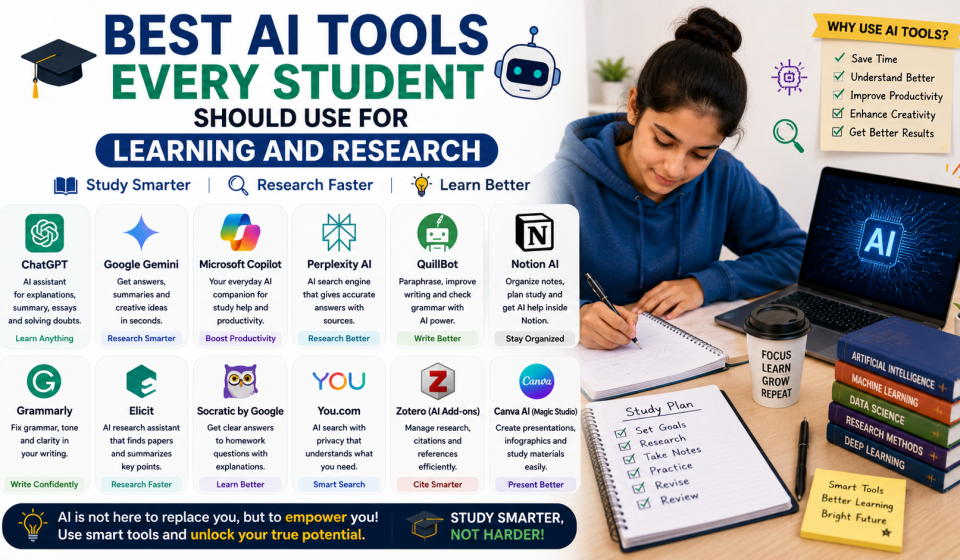

Discover the best AI tools every student should use for learning and research in 2026. Explore free and popular AI tools for writing, research, note-taking, studying, coding, presentations, and productivity.
Artificial Intelligence (AI) has transformed the way students learn, research, and complete academic tasks. Instead of spending hours searching through books and websites, students can now use AI-powered tools to find information, summarize lengthy articles, improve writing, solve mathematical problems, create presentations, organize notes, and even learn programming more efficiently. As educational technology continues to evolve in 2026, AI tools are becoming valuable learning companions that help students save time while improving productivity and understanding.
However, AI should be viewed as a learning assistant rather than a replacement for independent thinking. The best students use AI to understand difficult concepts, organize their ideas, check grammar, practice problem-solving, and explore new topics while continuing to develop their own knowledge and critical thinking skills. By choosing reliable AI tools and using them responsibly, students can enhance their academic performance, strengthen research abilities, and prepare for future careers in an increasingly technology-driven world.
Why Students Should Use AI Tools
AI-powered applications make learning faster, more organized, and more interactive.
Major benefits include:
- Faster research
- Improved writing quality
- Better time management
- Personalized learning
- Instant explanations
- Better organization
- Increased productivity
- Enhanced creativity
AI tools help students focus more on learning instead of repetitive tasks.
ChatGPT
ChatGPT is one of the most popular AI learning assistants for students.
Students can use it for:
- Understanding difficult concepts
- Brainstorming ideas
- Writing outlines
- Solving programming problems
- Learning new topics
- Language practice
- Exam preparation
- Homework guidance
It works best when students use it to learn rather than simply copy answers.
Google Gemini
Google Gemini combines AI assistance with Google’s search capabilities.
Students commonly use it for:
- Research assistance
- Content summaries
- Academic explanations
- Study planning
- Brainstorming
- Writing support
It helps organize information from multiple sources.
Microsoft Copilot
Microsoft Copilot supports productivity and learning across Microsoft applications.
Useful features include:
- Document drafting
- Presentation creation
- Spreadsheet assistance
- Writing suggestions
- Data organization
- Productivity improvement
It is especially useful for students using Microsoft Office.
Grammarly
Grammarly helps students improve the quality of their writing.
It assists with:
- Grammar correction
- Spelling
- Sentence clarity
- Vocabulary improvement
- Tone suggestions
- Proofreading
It is useful for essays, assignments, and emails.
Perplexity AI
Perplexity AI is designed to help users research topics by providing concise answers with source references.
Students use it for:
- Academic research
- Fact checking
- Topic exploration
- Quick summaries
- Learning complex subjects
- Finding reliable references
It can save time during research projects.
Notion AI
Notion AI combines note-taking with intelligent organization.
Students can use it to:
- Organize notes
- Create study plans
- Summarize lectures
- Generate outlines
- Manage projects
- Track assignments
It helps students stay organized throughout the semester.
Canva AI
Canva AI makes designing presentations and educational materials much easier.
Popular uses include:
- Presentation design
- Posters
- Infographics
- Study flashcards
- Visual learning materials
- Social media projects
Its templates save students valuable time.
GitHub Copilot
Students learning programming can benefit from GitHub Copilot.
It helps with:
- Writing code
- Understanding programming concepts
- Debugging
- Code suggestions
- Learning new programming languages
- Software development practice
It supports beginner and advanced programmers.
QuillBot
QuillBot helps students improve writing while maintaining originality.
Useful features include:
- Paraphrasing
- Grammar checking
- Summarizing
- Citation assistance
- Sentence rewriting
- Vocabulary improvement
It is especially useful for academic writing.
Otter.ai
Otter.ai automatically converts spoken lectures into written notes.
Students can use it for:
- Lecture transcription
- Meeting notes
- Interview recordings
- Study summaries
- Group discussions
- Revision materials
This helps students review lessons more efficiently.
How to Use AI Responsibly
AI should support learning rather than replace it.
Best practices include:
- Verify important information
- Avoid plagiarism
- Understand concepts yourself
- Cite sources properly
- Think critically
- Edit AI-generated content
- Practice independently
- Follow academic integrity guidelines
Responsible AI use leads to better learning outcomes.
Benefits of AI for Education
AI technology offers many long-term educational advantages.
Key benefits include:
- Faster learning
- Better organization
- Improved research
- Stronger writing skills
- Greater productivity
- Personalized education
- Better collaboration
- Career readiness
Students who use AI wisely can develop valuable academic and professional skills.
Source Links
Conclusion
AI tools have become powerful learning companions for students in 2026, offering smarter ways to study, research, write, and organize academic work. From understanding difficult concepts with ChatGPT and Google Gemini to improving writing with Grammarly and QuillBot, organizing notes with Notion AI, and creating presentations with Canva AI, these tools help students work more efficiently and develop valuable skills. They can save time, improve productivity, and make learning more engaging when used responsibly.
The most successful students use AI as a support system rather than a shortcut. Verifying information, thinking critically, practicing independently, and maintaining academic honesty remain essential for long-term success. By combining AI technology with consistent study habits, curiosity, and dedication, students can strengthen their knowledge, improve research abilities, and prepare confidently for future academic and career opportunities in a rapidly changing digital world.
Frequently Asked Questions (FAQs)
1. Are AI tools useful for students?
Yes. AI tools help students with research, writing, studying, coding, note-taking, and improving productivity.
2. Which AI tool is best for homework assistance?
ChatGPT and Google Gemini are popular choices for understanding concepts and receiving step-by-step explanations.
3. Can AI tools improve writing skills?
Yes. Tools like Grammarly and QuillBot help improve grammar, sentence structure, vocabulary, and clarity.
4. Is it acceptable to use AI for school assignments?
Students should follow their school’s academic integrity policies. AI should be used to support learning and idea generation rather than submitting AI-generated work as their own.
5. Which AI tool is best for research?
Perplexity AI, ChatGPT, and Google Gemini are commonly used to explore topics and begin research, but students should always verify information with reliable sources.
6. Can AI help students learn programming?
Yes. GitHub Copilot and ChatGPT can assist with coding, debugging, and understanding programming concepts.
7. What AI tool is good for taking notes?
Notion AI and Otter.ai are excellent choices for organizing notes and transcribing lectures.
8. Are free AI tools available?
Yes. Many AI platforms offer free versions with useful features, although premium plans provide additional capabilities.
9. Can AI replace teachers?
No. AI is a learning assistant that supports education but cannot replace the guidance, experience, and mentorship provided by teachers.
10. How can students use AI responsibly?
Students should verify information, avoid plagiarism, cite sources when required, think critically, and use AI to strengthen their understanding rather than replace independent learning.